

The GTA VI Extended Look gave us the clearest view yet of the in-game HUD — and it points to a much smarter police system. Here's what each part appears to mean. We mark what's shown on screen versus what's still our interpretation.
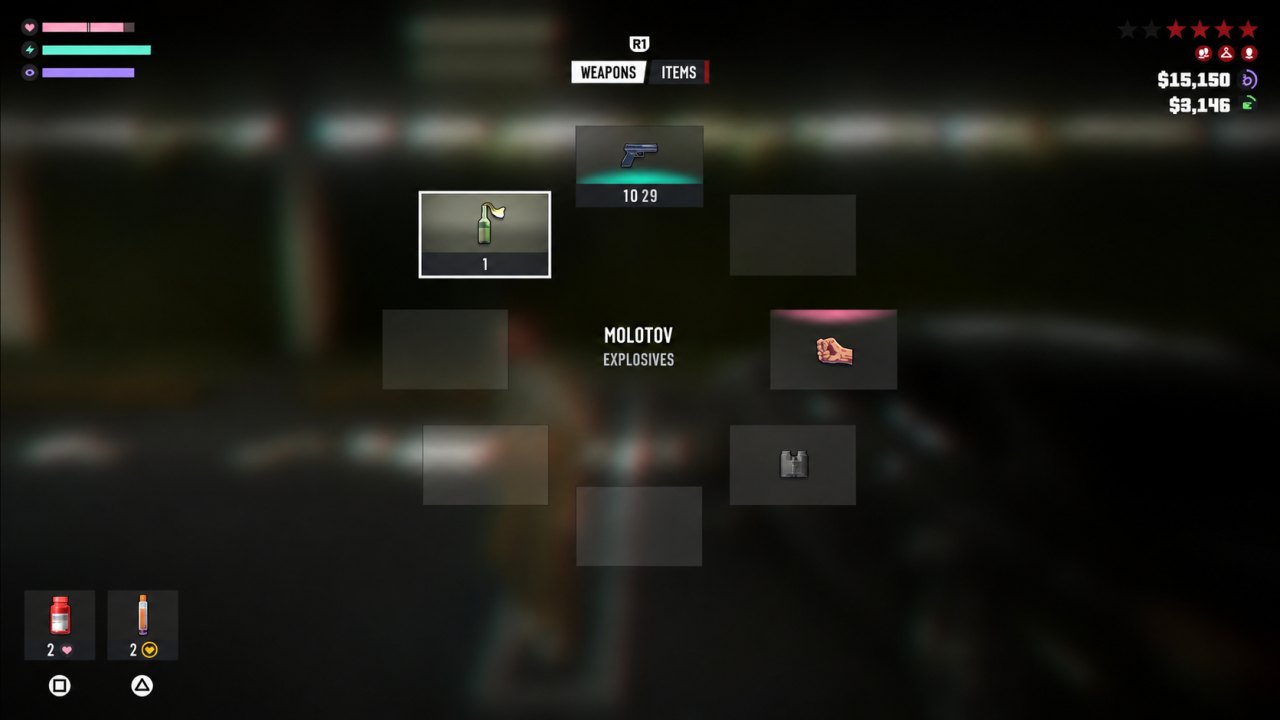
The full HUD — Health, Stamina and Focus (top-left); the six-star wanted meter and two money counters (top-right); the weapon wheel (centre).
The wanted system: police track you, not just your location
The wanted meter sits top-right, and it now tops out at six stars — a return to the six-star maximum last used before Grand Theft Auto V, which capped it at five. The bigger change, though, is the row of small identification icons beneath the stars — they represent what the police currently know about you:
- Witnesses (two heads) — people who saw the crime and can describe you.
- Your description / face (a single head) — the police have a description of your appearance.
- Your clothing (a hanger) — they're looking for someone dressed like you.
- Your vehicle (a car) — they're hunting the car you were last seen in.
- Surveillance (a camera) — CCTV has footage of you. Taking cameras out before a crime cuts how much the police can pin on you.
- Weapon (a gun) — you're flagged as armed.
Each icon is a separate thread of evidence — and you can cut them one by one. Silence the witnesses or leave their area, disable the cameras, change clothes, ditch or swap the car, and put your gun away; as each lead clears, the police's picture of you falls apart.
The wanted stars act as a live indicator of what the police currently know about you:
- Hollow Stars: A crime has been reported, but the police have not yet identified you.
- Solid White Stars: The police are actively chasing you and have a direct line of sight.
- Flashing White Stars: You have broken their line of sight, but they are still pursuing you.
- Red Stars: The police have lost sight of you, but you remain inside the “heat zone” surrounding the crime scene, where officers are searching. At six stars, this search area expands across the entire map.
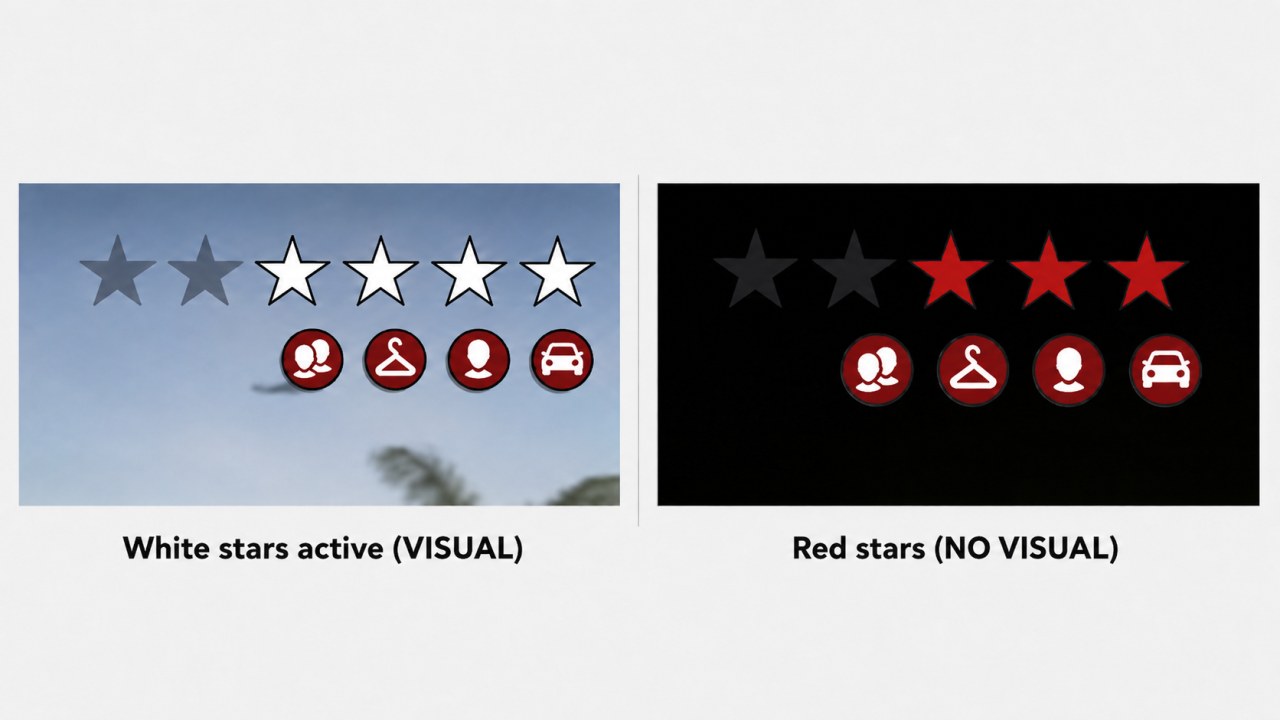
Hollow stars mean you have not yet been identified. Solid white stars indicate an active police visual, flashing white stars mean the police are still pursuing you without direct sight, and red stars mean they are searching the surrounding area.
The system appears to involve more than simply waiting for a search zone to disappear. Police can reportedly track details about your appearance, clothing, and vehicle. In the footage, one of these indicators disappears when the player abandons their car, suggesting that changing clothes or ditching and swapping vehicles may remove individual leads.
The likely escape strategy is therefore to break the police’s line of sight, leave the heat zone, and change anything matching your description. This resembles Red Dead Redemption 2’s behaviour-based evasion system, where escaping depends partly on how the player reacts after committing a crime.
What is confirmed: The Extended Look footage shows a six-star wanted meter and indicators associated with witnesses, clothing, the suspect’s description, and their vehicle. The precise meaning of each star appearance and exactly how every identification indicator is cleared have not yet been officially explained.
The stat bars (top-left)
Three confirmed meters sit on the left:
- Health (heart).
- Stamina (lightning bolt).
- Focus (eye icon).
Health, Stamina and Focus can be developed through activities, while food and drinks provide temporary boosts. Some consumables can push Health above its normal limit until that extra reserve is lost. Focus slows time in combat, can reveal weak points on NPCs and vehicles, and can also highlight accessible doors while exploring.
Rockstar has not published the final numerical values, upgrade thresholds, or every effect tied to each stat. GTA Codex therefore treats the three meters themselves—and their broad roles—as confirmed, without inventing a full survival system around them.
Weapons and Items — two separate wheels
GTA VI splits selection into a Weapons wheel and an Items wheel (note the tab toggle at the top). The weapon wheel shows a Pistol, a Molotov (filed under Explosives), fists / melee, and what looks like binoculars. Keeping items on their own wheel means usable gear no longer clutters weapon selection.
Quick-use consumables sit bottom-left. Reporting on the Extended Look identifies healing items including Zombix (restores health — with an on-screen warning that it becomes less effective if overused) and EpiPen-style injectors. The two bottles in the quick slots match these: a health item and an injector.
The two money counters
The HUD shows two money values. These are reported to be cash on hand versus a bank balance — not two different currencies.
On the "crypto" rumour: you may have seen claims that GTA VI pays you in cryptocurrency you can cash out for real money. Rockstar has confirmed nothing of the sort. Those claims trace back to leakers promoting their own coin — treat them as marketing, not fact. More in our Discover note.
Confirmed vs unconfirmed
- Shown in the Extended Look: the six-star wanted meter with description / clothing / vehicle icons, the three stat bars, the Weapons and Items wheels and their contents, two money counters, and the Zombix / EpiPen healing items.
- Not confirmed: the fine detail of how each identification icon clears, the final stat values and upgrade thresholds, the exact rules for every wanted identifier, and anything about cryptocurrency.
Verified HUD, Focus and wanted additions
The HUD includes Health, Stamina and Focus. Activities can permanently raise these stats, while food and drinks provide temporary boosts; some consumables can exceed the normal health limit until that extra reserve is lost. Focus slows time for combat and can reveal vehicle weak points; it can also be used while driving.
HUD options include showing or hiding elements while on foot, replacing the map with a compass, and disabling Criminal Profile notifications. Mission waypoints are reported in magenta, while custom waypoints use a light teal/cyan colour.
Controls, prompts and exploration Focus
Character movement is reported as smoother and less weighty than earlier preview impressions, with sprint mapped to pressing L3 on the PlayStation layout. The action-prompt interface has also been refreshed and supports numerous custom options.
Focus has an exploration role alongside its combat use: activating it can highlight accessible doors, helping players identify fully modelled interiors. This is a discovery aid, not confirmation that every highlighted building is enterable or that every interior behaves the same way.